

kcalm vs Lose It!
Two food trackers, compared for everyday use.
Compare Lose It! database logging with kcalm photo and chat estimates. Review barcode support, nutrient detail, platforms and current access terms.
- kcalm
- Current price shown before purchase · Eligible native trial or 3 free bot days · iOS, Android, web, Telegram, WhatsApp
- Lose It!
- Premium USD 79.99/yr · iOS, Android, web
kcalm team
Nutrition & Wellness
Choose kcalm if
Your logging dies because searching a database for every meal is tedious, or because a social feed and a streak counter make tracking feel like a performance.
Choose Lose It! if
You want a web app, barcode scanning matters, you sync a Garmin or Fitbit, or a support group is what keeps you honest.
Product accuracy, access and privacy wording updated on 10 November 2026. Competitor features and prices retain the source dates cited below; confirm current terms before buying.
kcalm accepts meal photos and descriptions and returns nutrition estimates you can review. The native apps support photo, text and voice logging. Telegram supports photo and text logging. WhatsApp supports photo, text and voice notes. Siri logging is available on iPhone. See the Telegram guide for that channel's workflow.
Lose It! is a database calorie counter and a good one. FitNow launched it in 2008, Ziff Davis has owned it since 2022, and its US App Store listing shows 4.8 stars from more than 770,000 ratings. It runs on iPhone, Android and the web, searches a catalogue it advertises at 56 million-plus foods, scans barcodes, syncs Garmin and Fitbit on Premium, and gives you a community to answer to.
Compare the current purchase screens for the same billing period and currency. Check the App Store, Google Play, the bot or kcalm.app/plans/ for the current price and terms for that channel. Currency, offers and eligibility can vary. Competitor prices in this article are historical source observations, not a live quote.
Quick comparison
| Feature | kcalm | Lose It! |
|---|---|---|
| Primary logging method | AI photo, text, voice | Database search and select |
| Photo logging | Available with a plan or eligible trial | Snap It, Premium only |
| Plain-language input | Type "two eggs and toast" | No, search and select |
| Chat logging (Telegram/WhatsApp) | Yes, both | No |
| Voice input | Native apps and WhatsApp; Siri on iPhone | Say It, Premium, English only |
| Barcode scanning | No | Scan It, moving behind Premium |
| Food database approach | AI estimate, no search step | 56M+ food and recipe catalogue |
| Micronutrients | 42 nutrients per meal, AI estimated | Vitamins and minerals under Premium |
| GLP-1 tracking | Included, shots and side effects | Premium only, doses and levels chart |
| Exercise tracking | AI estimates burn from a sentence | Full log plus Fitbit, Garmin, Apple Health, Google Fit (Premium) |
| Social feed and groups | None | Friends and support groups, free tier |
| Ads | None | Yes on free, some promos remain after the ad-free purchase |
| Platforms | iPhone, Android, Telegram, WhatsApp, web dashboard | iOS, Android, web |
| Access | Eligible native trial or 3 free bot days; terms below | Unlimited manual logging with ads |
| Price | Current price and terms | USD 79.99/year standard, promotions vary |
| Feel | Quiet, no streaks | Community-driven, upgrade prompts |
How logging actually works
kcalm: describe it, in words or a photo
One action produces the whole entry, and the same input handles more than food. Log "30 minute run" and the AI estimates the burn and adds it to the day's budget.
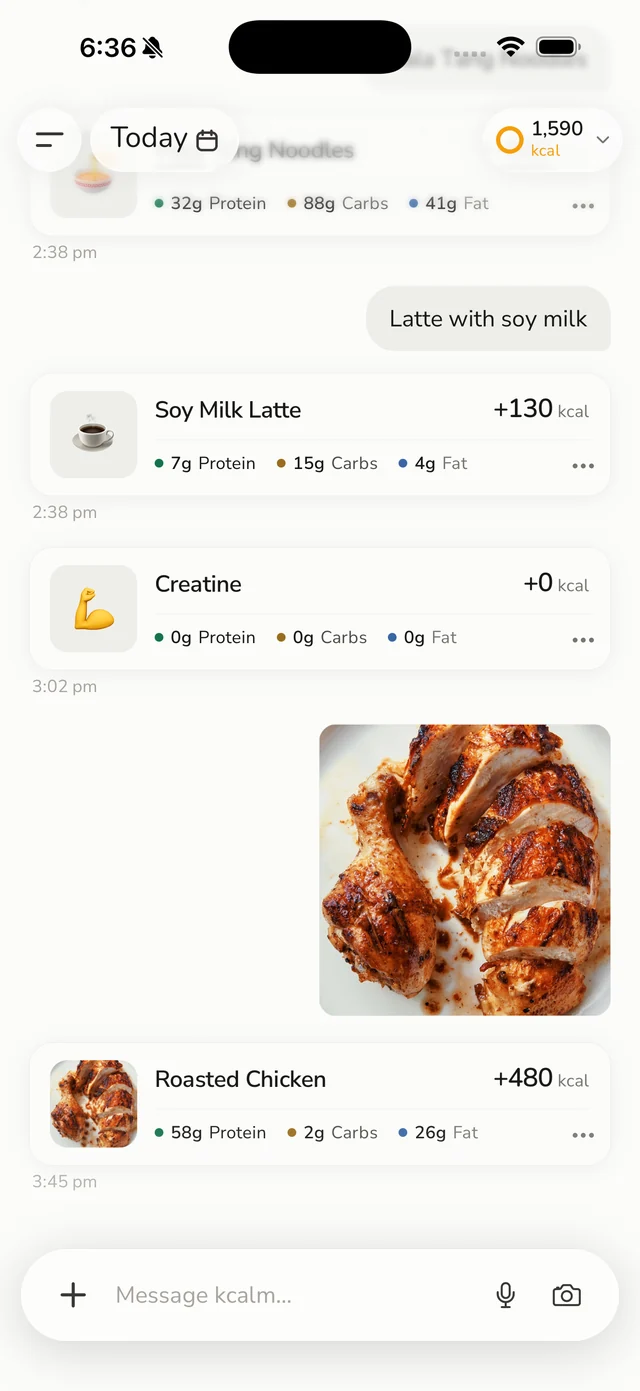
The rest of the day is light: water in one tap, weigh-ins that keep a progress photo you can compare side by side, calorie progress on the lock screen via Live Activities, six home-screen widgets, and a weekly AI briefing over your eating timeline and nutrient trends.
kcalm provides nutrition estimates. We have not published a reproducible kcalm-specific calorie-accuracy benchmark, so we do not promise a percentage accuracy or a fixed error range. Review the foods, portions and ingredients before relying on an estimate. See how kcalm food estimates work for the limits and checks.
Lose It!: search first, with Snap It, Scan It and Say It on top
Lose It! is a search-and-select tracker with AI bolted around the edges, so Snap It does not produce a free-form estimate. Per Lose It!'s own documentation, it will "analyze the photo to find and suggest the best matches in our food database for you to log", with an estimated serving you can Swap or Edit. Every entry lands as a database record with a full nutrition panel, but the photo is a shortcut into search, not a replacement for it. Snap It and Say It are Premium only and, like the barcode scanner, require your device language to be English.
The barcode scanner is the bigger story, and Lose It!'s help centre is unusually candid about it:
We are also in the process of moving the barcode scanner (Scan It) and nutrition label scanner to part of our Premium features. Some free members will still have access as we transition, while others will not. ... We understand this change may be disappointing, but many users continue to succeed on their weight loss journey without these tools.
Until that transition finishes, whether your account still has the scanner is settled account by account.
What one photo gives you back
The difference between "photo as a shortcut into search" and "photo as the estimate" shows up on food the catalogue does not have. This is a bowl of mala tang read from one photograph.
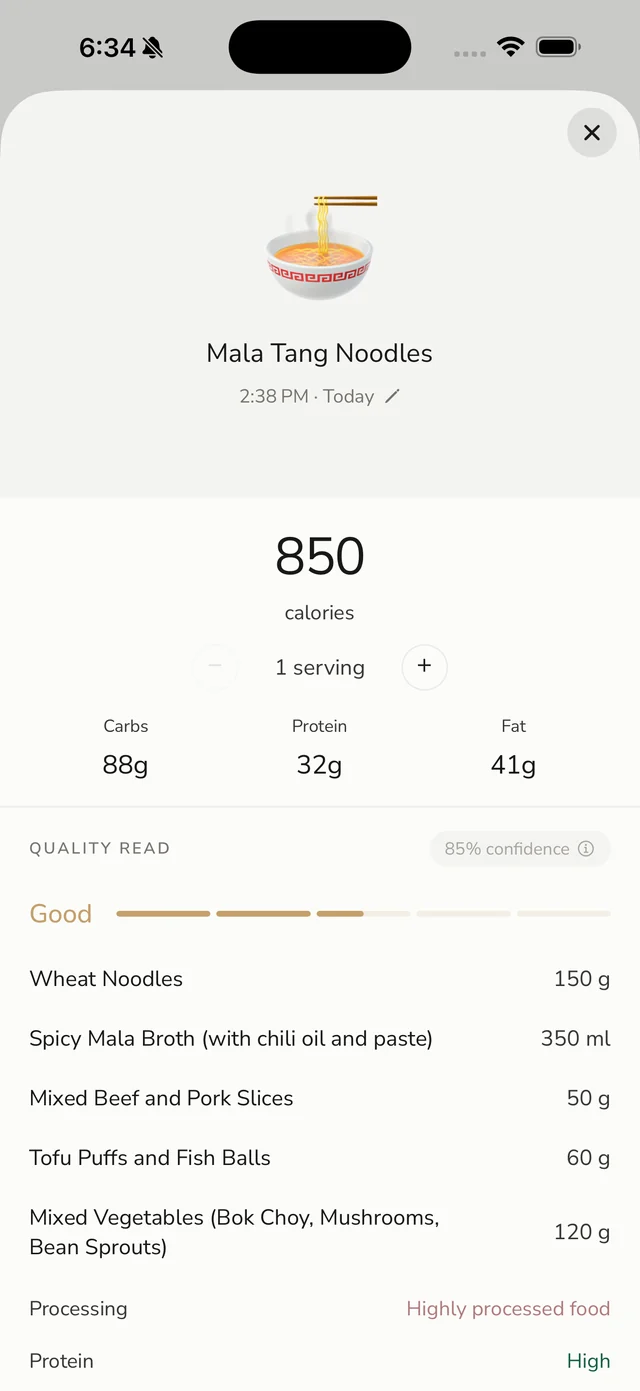
The confidence shown in this example is a model score, not a validated calorie-accuracy result.
Snap It would try to match that bowl to entries in a 56 million-item catalogue. Some of those matches would be close. The itemised version above is an estimate, and it is an estimate of what is actually in the bowl.
Every logged meal also carries the micronutrients, which in Lose It! is a Premium feature read from database records.
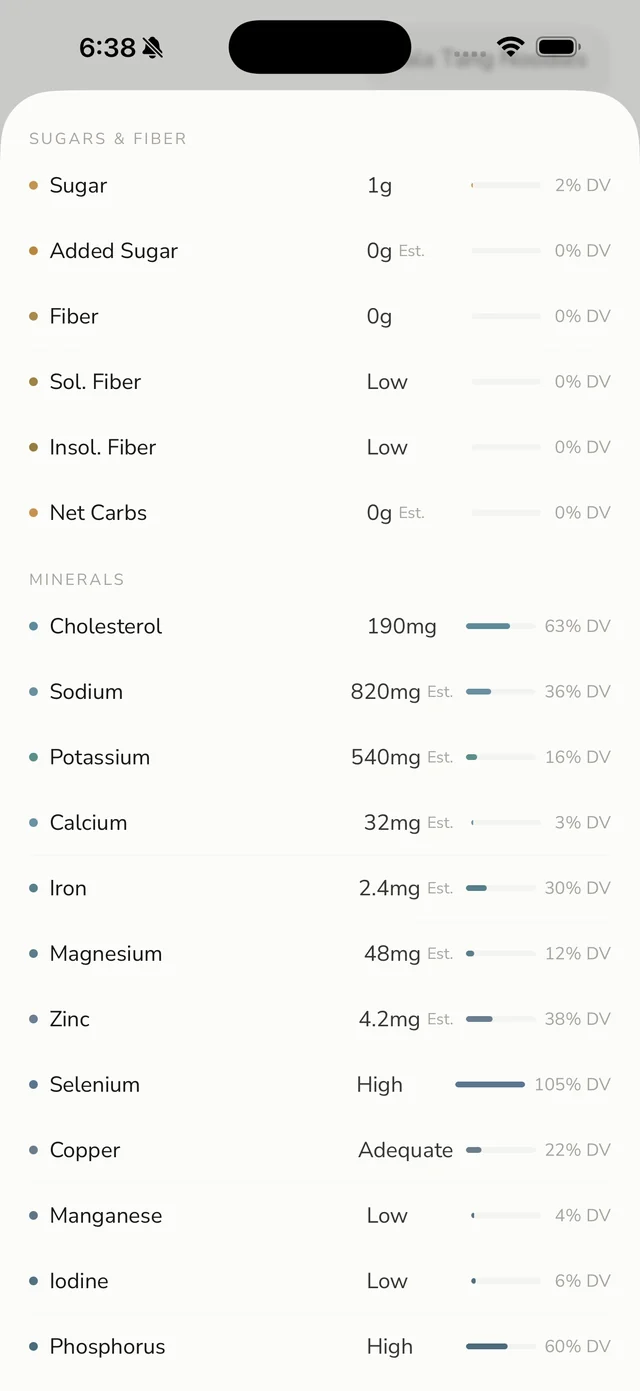
Lose It!'s figures for a packaged product are exact where kcalm's are inferred, and kcalm marks them "Est." to be clear about that. For anything unpackaged, both are working from a model of the food rather than a label.
Logging without opening an app
kcalm has a Telegram bot and a WhatsApp bot. Send a photo or a sentence to a chat thread you already have open and it syncs to the kcalm app. No app to launch, no meal slot to pick, no search field.
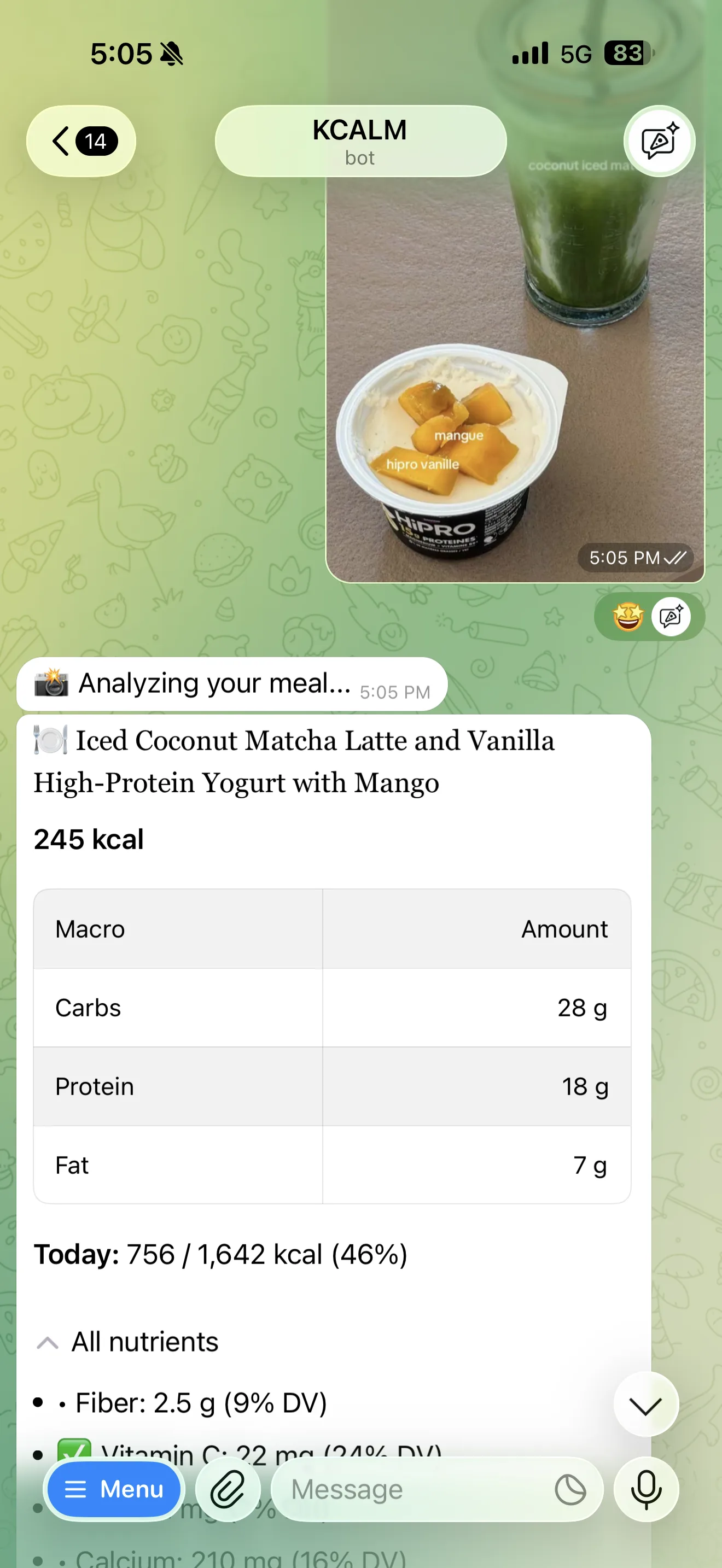
On iPhone, Siri is a third route: "Hey Siri, log my lunch" records the meal hands-free. Lose It! has nothing comparable. iOS, Android, an Apple Watch companion and a web experience at loseit.com give it far broader device coverage than kcalm, but each of those surfaces is still "open the app and search". The difference shows up at dinner with other people, when opening a diet app is awkward and sending a message is not.
Community, ads, and how much noise you want
Lose It! is built for social accountability
Community is a headline free feature, not an afterthought. The App Store listing puts "Community Support" alongside calorie tracking and the weight loss plan in the free tier. For plenty of people that is the mechanism that works, and it is the largest single thing kcalm does not offer.
Ads and promotions are part of the deal
The free version carries full-page interstitial ads and banners inside your daily log. A one-time purchase removes those, but Lose It!'s help centre confirms that upgrade prompts stay, dismissible affiliate promotions appear about once a week, and affiliate cards in the Discover and Dashboard tabs still appear. Google Play labels the Android build "Contains ads". Any member can toggle specific promotional categories off, including one named "Dietitian / Clinical Health Offers (GLP-1 Partners)", and the GLP-1 feature set can be hidden entirely, but the ad-free purchase does not remove those Discover and Dashboard cards.
The trade is legible enough: ads and affiliate partnerships are what pay for a free tier with unlimited logging, a full food database and community features, which is more than most rivals give away. Even so, if you are tracking calories because your relationship with food is already fraught, being sold a weight-loss drug partnership inside your food diary is not neutral. kcalm has no feed, no friends list, no badges, no streak to break, no ads and no advertising business behind the app. It cuts both ways: if a group is what has kept you consistent before, the quiet is a downgrade.
GLP-1 medication support
kcalm is not unique here. Lose It!'s GLP-1 tooling is thorough: it covers Zepbound, Mounjaro, Wegovy, Ozempic and three older injectables plus oral semaglutide, records dose and injection location down to stomach quadrant, arm or thigh, and plots an estimated medication level chart modelled from clinical research.
kcalm covers the same territory: shot logging with estimated medication levels, injection-site rotation, and side-effect logging for Wegovy, Ozempic, Mounjaro and Zepbound. Two things separate them. Lose It! requires Premium for the whole GLP-1 feature set, while kcalm builds it into the app itself. And on a low-appetite day, one message to a bot still leaves a real record instead of a gap. For the numbers, see GLP-1 calorie and protein targets.
Privacy and data
Meal photos and logs are handled under the kcalm Privacy Policy, including processing by service providers. Review the policy for data use, retention and deletion options. Read the Privacy Policy for the current details.
Lose It! is published by FitNow, Inc., part of the publicly listed media group Ziff Davis. It publishes a privacy policy and the standard Google Play data safety disclosures. But the free tier is ad-supported, affiliate partnerships sit in the Discover and Dashboard tabs, and GLP-1 partner marketing is a named promotional category you opt out of rather than into.
Pricing
| Plan | kcalm | Lose It! |
|---|---|---|
| Access | Eligible native trial or 3 free bot days; terms below | Unlimited manual logging, with ads |
| Trial | Eligible native trial or 3 free bot days; terms below | 7-day free trial for new members |
| Monthly | Current price and terms | No monthly plan in the official tiers |
| Annual | Current price and terms | USD 79.99 standard |
| Lifetime | Not offered | USD 299.99, or USD 229.99 for existing Premium members |
New native-app accounts need a subscription or an eligible 7-day trial for AI logging. Trial availability and renewal terms are shown on the purchase screen. Existing accounts may retain an earlier allowance. Eligible new Telegram and WhatsApp accounts get 3 free days in the chat with no card. The first meal or Start now begins them; the bot shows the end date. A paid plan is needed to continue AI logging afterward. Existing accounts may retain an earlier allowance.
Where Lose It! is the better buy
- It runs on iOS, Android, Apple Watch and the web, and has barcode and nutrition label scanning at all, which kcalm does not offer in any form.
- An advertised catalogue of 56 million-plus foods and recipes gives exact packaged-food numbers rather than an estimate, and Premium reports vitamins, minerals and sugar from those records rather than inferring them.
- Premium syncs Fitbit, Garmin, Google Fit, Withings and Apple Health, pulling exercise and weight data in automatically, where kcalm reads Apple Health only.
- Free-tier logging is unlimited, so you can track for months without paying anything.
- Friends and support groups provide accountability kcalm has deliberately left out, and Premium adds intermittent fasting, meal planning, and goals for blood pressure, glucose, cholesterol and sleep.
Where kcalm is the better buy
- Logging works from Telegram, WhatsApp or Siri, so a meal gets recorded without opening an app at all.
- Photo and plain-language logging are the core method, not a Premium add-on, and food the catalogue has never heard of is no harder to log than a packet.
- The same sentence logs food or a workout, and every meal comes back with 42 nutrients rather than calories and macros alone.
- No ads, no affiliate cards and no GLP-1 partner marketing inside your food diary.
- No streak counter, no badges and no social feed, so a missed week costs you nothing psychologically.
- GLP-1 shot tracking, site rotation and side-effect logging are built into the app rather than gated behind Premium, and you can log a dose from a chat thread.
Switching takes about two minutes
Nothing needs exporting and nothing needs cancelling. Your Lose It! history and your community stay exactly where they are, and the free tier costs nothing to leave sitting there.
Choose the kcalm channel you want to try, read its current trial and renewal terms, and log a familiar meal. Check the identified foods and portions, then compare the effort and result with your existing tracker. Keep any existing subscription in mind when deciding whether to switch.
The bottom line
Lose It! is the better product if you want a web app, rely on barcode scanning, want Garmin or Fitbit data flowing in automatically, or need a support group to keep you honest. Its free tier is still one of the more generous in the category. Budget USD 79.99 a year for the AI features, and know that free carries ads and that the barcode scanner is heading behind the paywall.
New native-app accounts need a subscription or an eligible 7-day trial for AI logging. Trial availability and renewal terms are shown on the purchase screen. Existing accounts may retain an earlier allowance. Eligible new Telegram and WhatsApp accounts get 3 free days in the chat with no card. The first meal or Start now begins them; the bot shows the end date. A paid plan is needed to continue AI logging afterward. Existing accounts may retain an earlier allowance.
Frequently Asked Questions
Is there a free alternative to Lose It!?
New native-app accounts need a subscription or an eligible 7-day trial for AI logging. Trial availability and renewal terms are shown on the purchase screen. Existing accounts may retain an earlier allowance. Eligible new Telegram and WhatsApp accounts get 3 free days in the chat with no card. The first meal or Start now begins them; the bot shows the end date. A paid plan is needed to continue AI logging afterward. Existing accounts may retain an earlier allowance.
Is kcalm cheaper than Lose It! Premium?
Compare the current purchase screens for the same billing period and currency. Check the App Store, Google Play, the bot or kcalm.app/plans/ for the current price and terms for that channel. Currency, offers and eligibility can vary. Competitor prices in this article are historical source observations, not a live quote.
Does kcalm work on Android?
Yes. kcalm is on Google Play for Android phones, with the same photo, text and voice logging and the same account as the iPhone app. Apple Health sync, home-screen widgets, the lock-screen Live Activity and Siri are iPhone only. The WhatsApp and Telegram bots also work on any phone.
Can I track calories without opening an app?
With kcalm, yes. Send a photo or a sentence to the Telegram or WhatsApp bot and it syncs to the kcalm app, or ask Siri on an iPhone. Lose It! does not offer chat-based logging in its documented feature set, so every entry starts by opening the app or the website.
Does either app track vitamins and minerals?
Both do. kcalm breaks out 42 nutrients on every logged meal, including iron, vitamin D, omega-3, B vitamins, zinc and magnesium, and flags the ones running short. Lose It! covers vitamins, minerals, sugar and body measurements on Premium, read from database records rather than estimated, so its figures are exact where kcalm's are inferred. For packaged food in particular, that precision is a real reason to pick Lose It!
Which app is better for GLP-1 users?
Both are strong. Lose It!'s tools are comprehensive, with dose logging for eight medications, injection-site tracking and a modelled medication-level chart, but all of it requires Premium. kcalm includes shot tracking, site rotation and side-effect logging in the app, and lets you log a dose from a chat thread on a low-appetite day.
Sources
- https://loseit.zendesk.com/hc/en-us/articles/51906561286804-Lose-It-Membership-Tiers-Pricing (membership tiers and pricing, updated 4 August 2026)
- https://loseit.zendesk.com/hc/en-us/articles/47345136549652-What-is-Lose-It-Premium (Premium benefits, 7-day free trial, and variable pricing)
- https://loseit.zendesk.com/hc/en-us/articles/47773984823700-Unlocking-the-Barcode-Scanner-Scan-It (barcode scanner moving behind Premium)
- https://loseit.zendesk.com/hc/en-us/articles/47771695186580-How-to-Use-Snap-It (how Snap It photo logging works)
- https://loseit.zendesk.com/hc/en-us/articles/49210381551380-How-to-Log-Food-in-Lose-It (Say It voice logging, Premium and English-only)
- https://loseit.zendesk.com/hc/en-us/articles/50221250242964-GLP-1-Logging (Lose It! GLP-1 medication tracking and the promotions toggle)
- https://loseit.zendesk.com/hc/en-us/articles/51380378380052-Ad-Free-Version-of-Lose-It (ads, the one-time removal purchase, and what stays)
- https://apps.apple.com/us/app/lose-it-calorie-counter/id297368629 (App Store listing, ratings and feature breakdown)
- https://play.google.com/store/apps/details?id=com.fitnow.loseit (Google Play listing, Android rating, downloads, ads label)
Keep Lose It!. Add kcalm for a week.
Nothing to export, nothing to cancel, no account to create. Log the next meal both ways and keep whichever one you actually opened.